Sweo Vision is a built-in capability of Sweo AI Agent that allows it to analyze and understand images sent by customers - screenshots, photos, documents, and more - directly within conversations via chat or email.
There’s no need to enable or configure anything, and there’s no additional cost.
Sweo Vision helps:
Diagnose issues faster
Eliminate the need for lengthy customer explanations
Extract and understand visual content like error messages, receipts, product defects, and more
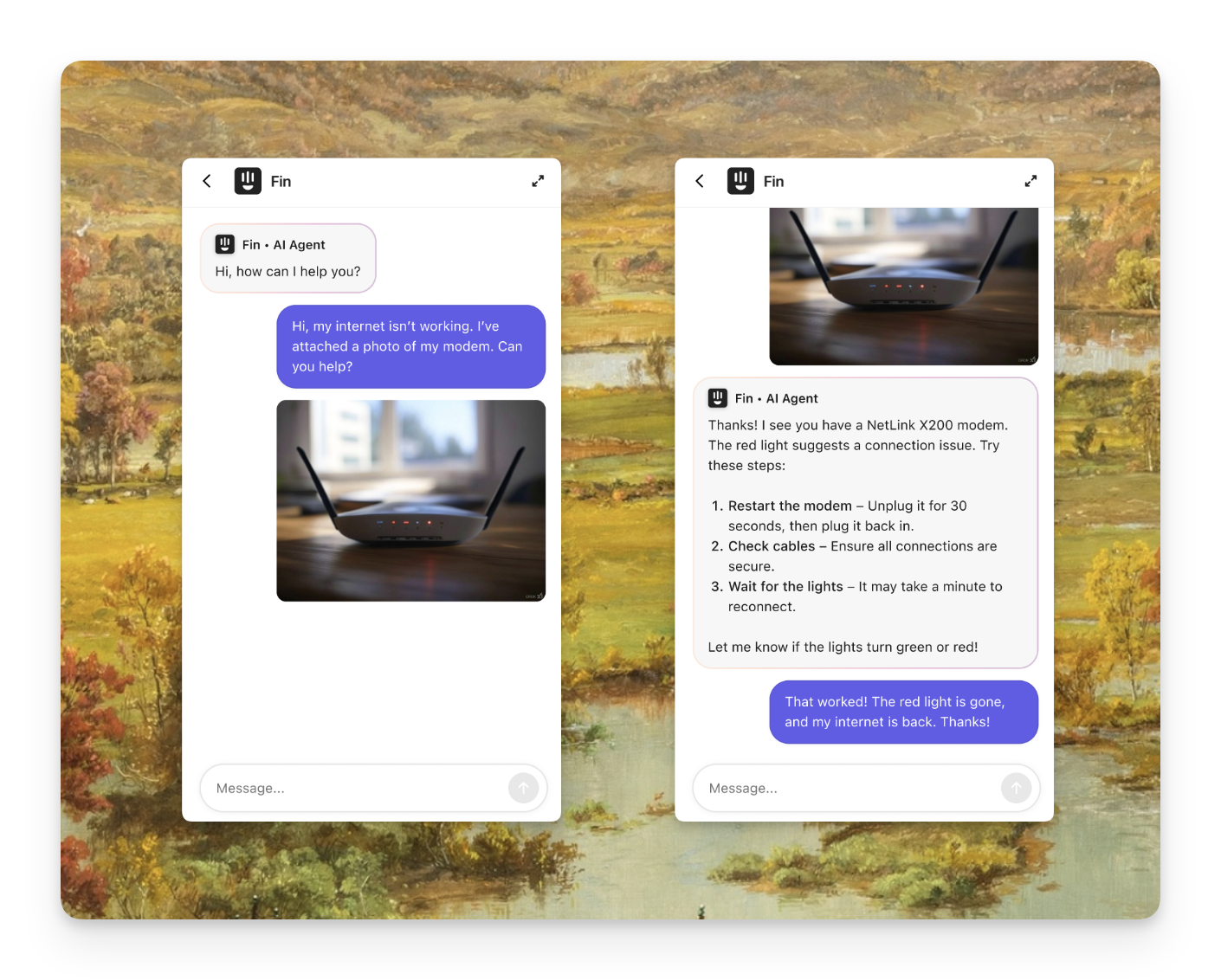
How Sweo Vision works
Sweo Vision uses multimodal large language models (LLMs) to understand images. When a customer sends an image, Sweo processes it using a vision-enabled LLM to generate a structured textual description. This transcription includes:
Extracted text (OCR)
UI elements and associated labels
Reference numbers, product details, and key highlights
Context-aware insights derived from the image
This description is then added to the chat history, which allows Sweo to incorporate visual context into its responses.
With this understanding, Sweo can:
Search your knowledge base more effectively
Resolve Tasks that depend on visual information
Provide relevant, actionable answers - just like it would from a customer's written input
Note:
Sweo does not train on or analyze images within your support content (e.g., images embedded in articles). It only processes images actively sent by customers during conversations.
Sweo doesn’t generate images, but it may include existing images from your support content in replies (Sweo Image Answers).
Sweo currently can't read ALT text in images.
Ways to use Sweo Vision
Industry | Example use cases |
FinTech |
|
SaaS |
|
ecommerce |
|
Gaming/Gambling |
|
Maximizing Sweo Vision
To get the most from Sweo Vision, combine it with Sweo’s other features:
Use with Sweo Guidance
Use Sweo Guidance to instruct Sweo to proactively ask for images when needed. You can also guide Sweo on what to look for in a screenshot and next steps based on the outcome.
Guidance examples:
If a customer shares a screenshot, identify the device type and suggest next steps accordingly.
If a user reports an error or other issue with our website, ask for a screenshot showing the error and a link to the page they are on before providing further assistance
Ask the customer to provide proof of payment (receipt), either as a screenshot or photo.
FAQs
What image formats does Sweo Vision support?
What image formats does Sweo Vision support?
Sweo Vision supports standard image formats including JPG, PNG, and GIF files shared by customers.
How does Sweo handle privacy and sensitive information in images?
How does Sweo handle privacy and sensitive information in images?
Sweo is designed with privacy in mind. The vision models are explicitly prompted not to extract any personal or sensitive information from images, such as credit card numbers, CVVs, or identification details. Additionally, images are stored temporarily and are automatically deleted after a short period.
Does Sweo store images?
Does Sweo store images?
Images are temporarily stored in a secure cloud environment and automatically deleted after a short period.
Do customers need to send images in a certain way?
Do customers need to send images in a certain way?
No, customers can upload or paste images into the chat or email. Sweo handles the rest.
Can customers send multiple images?
Can customers send multiple images?
Yes, Sweo will analyze each image individually and use the context to inform responses.
Does Sweo generate or send images?
Does Sweo generate or send images?
Sweo doesn’t generate images, but it may include existing images from your support content in replies (Sweo Image Answers).
Does Sweo Vision support multiple languages?
Does Sweo Vision support multiple languages?
Yes, Sweo can extract text from images in many languages, though accuracy depends on clarity and complexity.
Can I turn off Sweo Vision?
Can I turn off Sweo Vision?
No, Sweo Vision is built-in and cannot be disabled. It operates automatically as part of Sweo’s understanding of conversations.